Free app for Hammerhead Karoo
Live weather, on your Karoo screen.
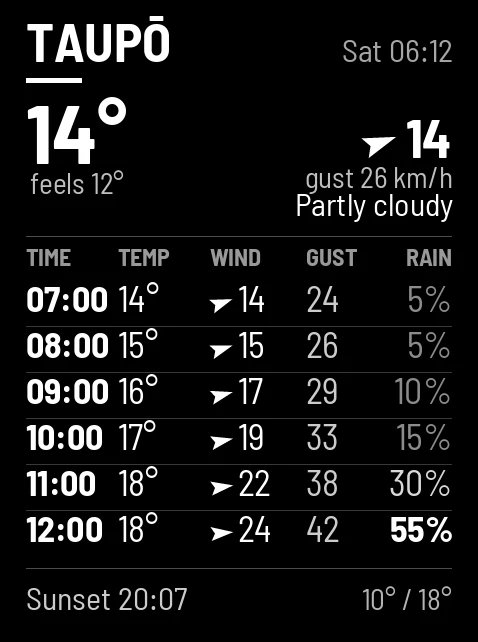
Pick a place and the card keeps itself current: every time your Karoo grabs your cards it gets a freshly drawn forecast — conditions now, then hour by hour the three things that change a ride: temperature, wind and rain.
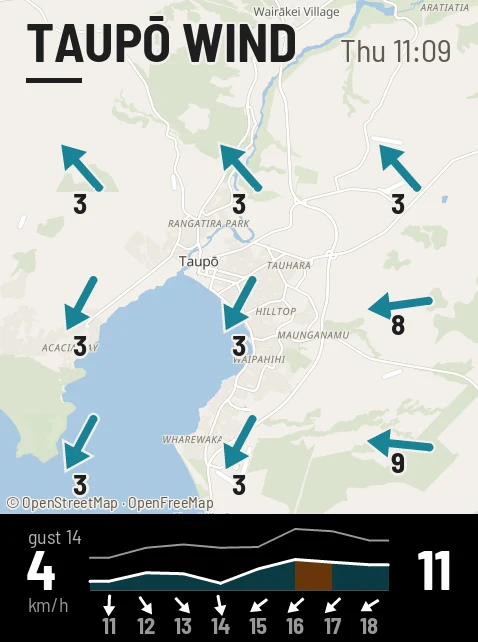
The rain card answers the question the overview only hints at — when it starts and how hard it gets. The wind map puts the wind on a map of your streets — which way it's going, how hard, and the next eight hours charted underneath — so you know which roads are into it before you roll out. Make all three for one place and your Karoo cycles between them as you ride. Every card is stamped with when it was drawn, so stale numbers can never pass themselves off as fresh.
Make one in 30 seconds
-
1
Make the card on your phone. Type it in sixteen high-contrast colours, or upload and crop any photo.
-
2
Your Karoo grabs it. Cards come down over the air at every sync — change the plan the night before, roll out with the latest.
-
3
It's a ride page. Flip to it like any data screen, or let auto-cycle rotate through your cards as you ride.
Questions
- Does the Hammerhead Karoo have a weather app?
- Not built in — but RideCards puts a live weather card in your ride screens. It's drawn fresh on every sync and stamped with when it was drawn, so stale numbers can never pass themselves off as fresh.
- Does the forecast update during a ride?
- The card is redrawn every time your Karoo grabs your cards — typically before you roll out. Sync again mid-ride and you get a fresh one.
- Can I get a rain-only view?
- Yes — the rain layout shows when the rain starts, how much falls, and a bar chart of millimetres per hour. Make it alongside the overview for the same place and your Karoo cycles between them.
More things riders put on their Karoo
Don't have the app yet? Get RideCards for your Karoo.